Looking for the MCP server? To let an AI assistant send documents for you, see the MCP documentation. It uses OAuth, needs no API key, and works on the free plan.
The API does one job well: take a template you already built in the GSD editor, send it to a signer, tell you when it's done, and hand you the signed PDF plus the certificate. Everything below is copy-pasteable. Run it from Terminal and you'll have a real envelope out in about 15 minutes.
1. The 15-minute quickstart
Step 1: get an API key
In the app, go to Settings → API & Webhooks and create a key
(API access is included on the Business plan). The key is shown once, so copy it right away.
It looks like gsd_live_… and goes in the Authorization header
of every request. Section 2 covers keys in detail.
Step 2: list your templates
Send this from Terminal (swap in your key):
curl -H "Authorization: Bearer gsd_live_YOUR_KEY" \
  https://gsdhere.com/api/v1/templates
You get back every active template, with the signer roles you'll need in the next step:
{
  "ok": true,
  "templates": [
    {
      "id": 12,
      "name": "Gym Liability Waiver",
      "created_at": "2026-08-01T09:12:44.000Z",
      "roles": [ { "key": "member", "label": "Member" } ],
      "has_payment_defaults": false
    }
  ],
  "has_more": false,
  "next_after": null
}
Step 3: create an envelope from a template and send it
curl -X POST https://gsdhere.com/api/v1/envelopes \
  -H "Authorization: Bearer gsd_live_YOUR_KEY" \
  -H "Content-Type: application/json" \
  -d '{
    "template_id": 12,
    "signers": [
      { "role": "member", "name": "Ana Diaz", "email": "ana@example.com" }
    ],
    "send": true
  }'
One signer per template role. The response tells you it went out:
{
  "ok": true,
  "envelope": {
    "id": 341,
    "name": "Gym Liability Waiver",
    "status": "sent",
    "template_id": 12,
    "signers": [
      { "id": 902, "role": "member", "name": "Ana Diaz", "email": "ana@example.com" }
    ]
  },
  "send": { "sent": 1, "failed": [] }
}
Ana now has a signing link in her inbox. (Tip: pass an
Idempotency-Key header on POSTs. If your script retries, you won't
double-send. Section 7 has the full semantics.)
Step 4: check status, then download the signed PDF
curl -H "Authorization: Bearer gsd_live_YOUR_KEY" \
  https://gsdhere.com/api/v1/envelopes/341
{
"ok": true,
"envelope": {
"id": 341,
"name": "Gym Liability Waiver",
"status": "completed",
"template_id": 12,
"created_at": "2026-08-22T15:03:11.000Z",
"sent_at": "2026-08-22T15:03:12.000Z",
"completed_at": "2026-08-22T15:09:40.000Z",
"expires_at": null,
"payment_status": "none",
"signers": [
{
"id": 902, "name": "Ana Diaz", "email": "ana@example.com",
"role": "Member", "status": "signed", "signing_order": 1,
"viewed_at": "2026-08-22T15:08:02.000Z",
"signed_at": "2026-08-22T15:09:40.000Z",
"declined_at": null,
"payment": { "required": false, "status": "none", "amount_usd": null }
}
]
}
}Once status is completed, both downloads exist:
curl -H "Authorization: Bearer gsd_live_YOUR_KEY" \
  -o waiver-signed.pdf https://gsdhere.com/api/v1/envelopes/341/documents/signed

curl -H "Authorization: Bearer gsd_live_YOUR_KEY" \
  -o waiver-certificate.pdf https://gsdhere.com/api/v1/envelopes/341/certificate
That's the whole loop. Rather than polling, add a webhook (section 5) and we'll tell you the moment it completes.
2. Authentication & keys
Every request carries a bearer token:
Authorization: Bearer gsd_live_…. Keys look like
gsd_live_A1b2C3d4…: the fixed gsd_live_ prefix
followed by 32 random characters. There is no other credential: no cookies, no
sessions, no OAuth dance.
- Create keys in the app under Settings → API & Webhooks (the owner or an admin can do it). Name each key for the system that will hold it ("Booking server", "Zapier") so you can tell them apart later.
- Shown once. The full key appears exactly once, at creation.
After that the app shows only the first characters
(
gsd_live_A1b2C3d4…). We don't store the full key, so we can't show it again. Lost a key? Revoke it and create a new one; it's free. - Revocation is instant. Revoking a key kills it on the next request. Nothing else changes: envelopes it created stay exactly as they are.
- Scopes. A key can be limited to
envelopes:read,envelopes:writeortemplates:read; a key created without scopes can do everything the API offers. A key missing a scope gets a403 insufficient_scopenaming the scope it needs.
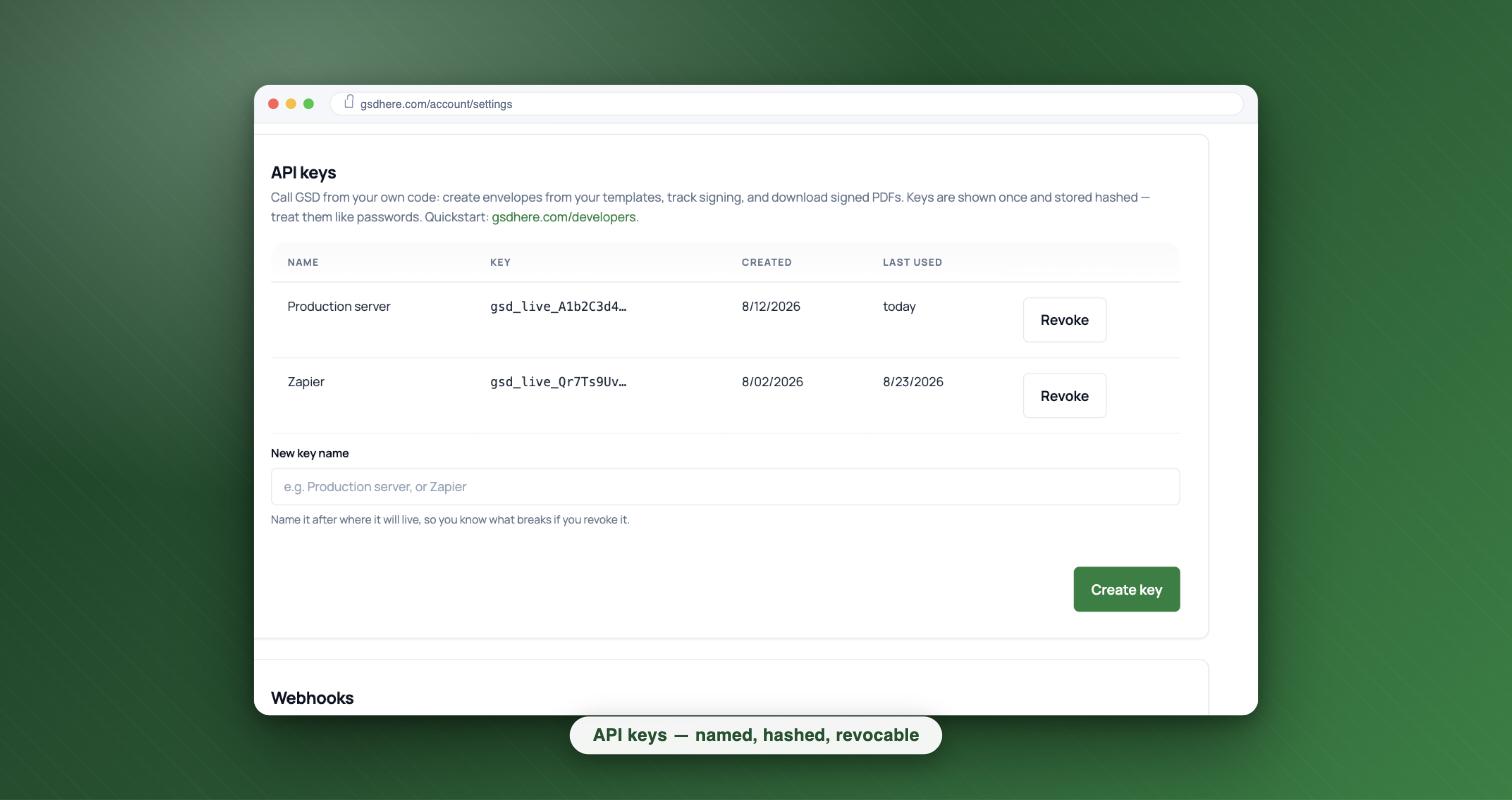
Treat keys like passwords: server-side config or a secrets manager, never in client-side code, never in a repository.
3. Testing without real emails
There is no separate sandbox mode. Every envelope you create is real and really emails its signers. The way to test is simple: send envelopes to your own email address, sign them yourself, and watch the statuses and webhooks fire. The free tier includes 5 envelopes a month, which is plenty for wiring up an integration before you go live.
Two habits make test runs painless: put "TEST" in the
message.subject so nobody mistakes the email, and void test envelopes
from the app when you're done so your envelope list stays clean.
4. A real integration, end to end: gym booking → waiver
Say your booking system takes a class reservation and the member must sign a liability waiver and pay a $25 day fee before they walk in. When the booking is confirmed, your server makes one call. Here it is with prefill, a custom email message, and payment collected before signing:
POST /api/v1/envelopes
Authorization: Bearer gsd_live_YOUR_KEY
Content-Type: application/json
Idempotency-Key: booking-58213

{
  "template_id": 12,
  "signers": [
    { "role": "member", "name": "Ana Diaz", "email": "ana@example.com", "phone": "+15125550137" }
  ],
  "prefill": {
    "class_name": "Kettlebell Basics",
    "class_date": "2026-09-02"
  },
  "message": {
    "subject": "Your waiver for Kettlebell Basics",
    "body": "Please sign before your first class on Sep 2 — takes about a minute."
  },
  "payment": { "amount_usd": 25, "before_signing": true },
  "send": true
}
Response (201 Created):
{
  "ok": true,
  "envelope": {
    "id": 355,
    "name": "Gym Liability Waiver",
    "status": "sent",
    "template_id": 12,
    "signers": [
      { "id": 951, "role": "member", "name": "Ana Diaz", "email": "ana@example.com" }
    ],
    "payment": { "amount_usd": 25, "before_signing": true }
  },
  "send": { "sent": 1, "failed": [] }
}
Ana pays, signs, and your webhook receives envelope.payment_updated and then
envelope.completed. Your handler checks in the booking and pulls the signed
waiver into your records:
GET /api/v1/envelopes/355

{
  "ok": true,
  "envelope": {
    "id": 355,
    "name": "Gym Liability Waiver",
    "status": "completed",
    "template_id": 12,
    "created_at": "2026-08-30T18:20:05.000Z",
    "sent_at": "2026-08-30T18:20:06.000Z",
    "completed_at": "2026-08-30T18:26:51.000Z",
    "expires_at": null,
    "payment_status": "paid",
    "signers": [
      {
        "id": 951, "name": "Ana Diaz", "email": "ana@example.com",
        "role": "Member", "status": "signed", "signing_order": 1,
        "viewed_at": "2026-08-30T18:24:10.000Z",
        "signed_at": "2026-08-30T18:26:51.000Z",
        "declined_at": null,
        "payment": { "required": true, "status": "paid", "amount_usd": 25 }
      }
    ]
  }
}

GET /api/v1/envelopes/355/documents/signed   → the signed waiver (PDF)
GET /api/v1/envelopes/355/certificate        → certificate of completion (PDF)
The certificate notes the envelope was created via the API and by which key. Otherwise the evidence pack is identical to one sent from the app.
5. Webhooks: know when it's done without polling
Save a webhook URL in Settings → API & Webhooks and we POST you
JSON on envelope.completed, envelope.declined,
envelope.voided and envelope.payment_updated. Webhook URLs
must be public HTTPS; private or internal addresses are rejected.
The reliability contract
- Delivery is at-least-once. We record every delivery before we
attempt it, and your endpoint may occasionally see the same event twice, so de-duplicate
on
delivery_id(below). - Failures are retried 5 times after the initial attempt, at 1 minute, 5 minutes, 30 minutes, 2 hours and 6 hours. That's roughly 9 hours of cover for an outage on your side. A 2xx response ends the chain; anything else (or a timeout) schedules the next try.
- Every delivery is signed with your endpoint's secret
(HMAC-SHA256 over the exact raw body, in the
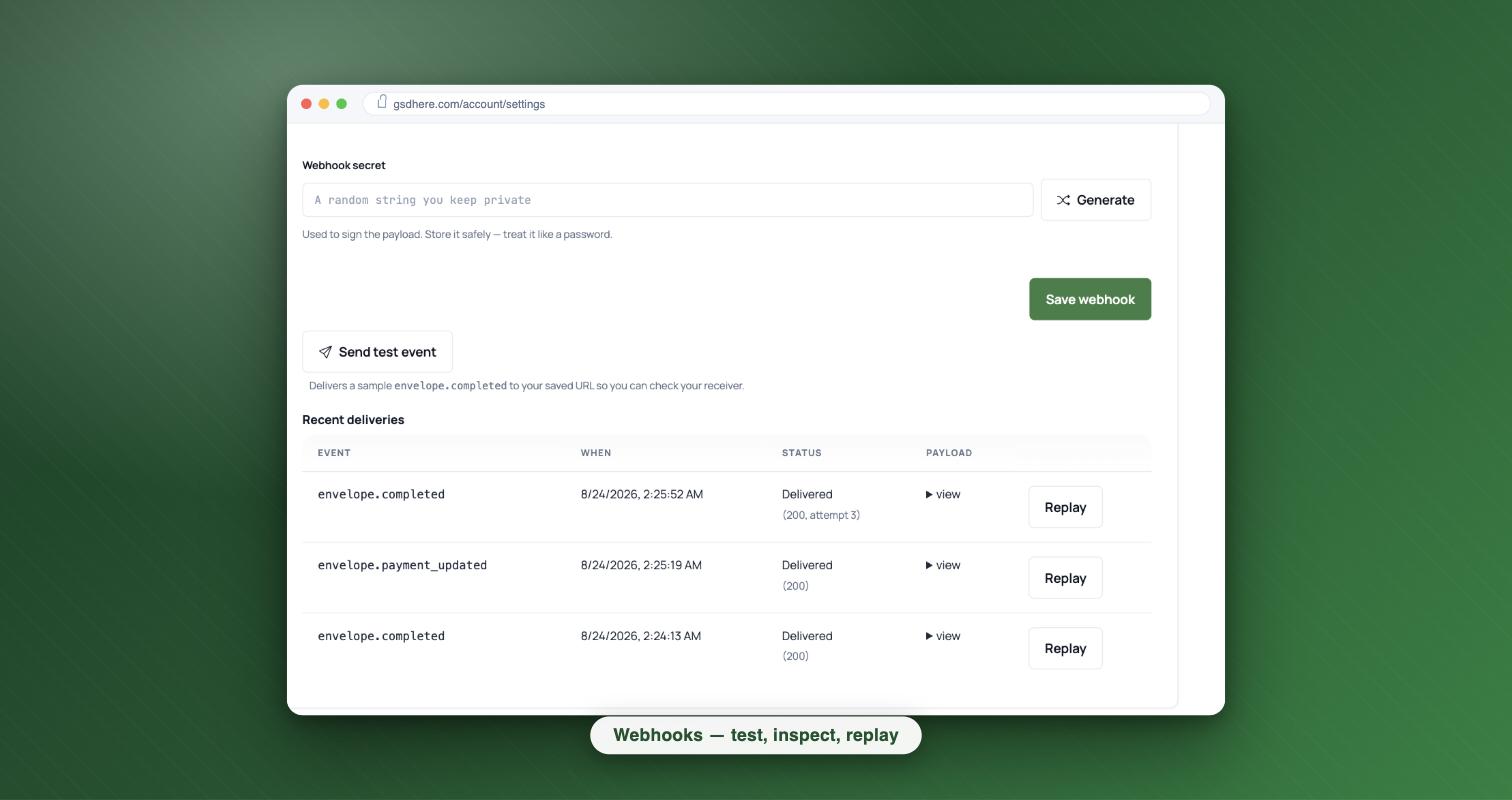
X-GSD-Signatureheader, assha256=<hex>). The event name rides inX-GSD-Eventand the delivery id inX-GSD-Delivery-Id. - You can see and re-run everything: the settings page shows the last 20 deliveries with status and attempt count, a one-click Replay per row, and a Send test event button to try your receiver before going live.
Verify the signature, check freshness, and de-duplicate in ~20 lines of Node:
const crypto = require('crypto');
const seen = new Set();  // swap for your datastore in production

app.post('/webhooks/gsd', express.raw({ type: 'application/json' }), (req, res) => {
  const expected = 'sha256=' + crypto
    .createHmac('sha256', process.env.GSD_WEBHOOK_SECRET)
    .update(req.body)
    .digest('hex');
  const given = req.get('X-GSD-Signature') || '';
  const ok = given.length === expected.length &&
    crypto.timingSafeEqual(Buffer.from(given), Buffer.from(expected));
  if (!ok) return res.status(401).end();

  const { event, payload, timestamp, delivery_id } = JSON.parse(req.body);

  // Freshness: the signed body carries the time it was built. Reject anything
  // older than ~5 minutes — a captured request can't be replayed at you later.
  if (Math.abs(Date.now() - timestamp) > 5 * 60 * 1000) return res.status(400).end();

  // De-dup: retries and manual replays deliver the same delivery_id again.
  if (seen.has(delivery_id)) return res.status(200).end();
  seen.add(delivery_id);

  res.status(200).end();  // answer 2xx fast — do your work after acking
});
The body carries event, payload (ids, statuses,
signer id + email, never document contents), a timestamp and the
delivery_id. Because each retry is signed over a fresh timestamp, the
freshness check never rejects a legitimate retry.
6. When something goes wrong
Every error has the same shape: a machine code, a human
message that echoes the value you sent, a fix, and a
docs link straight to the row below:
{ "ok": false, "error": { "code": "…", "message": "…", "fix": "…", "docs": "…" } }| Code | What you'll see | The fix |
|---|---|---|
invalid_api_key401 |
The API key 'gsd_live_abc…' isn't valid, or has been revoked. | Check you copied the whole key from Settings → API & Webhooks. Keys start with gsd_live_. If it was revoked, make a new one — it's free. |
plan_required403 |
Your plan does not include API access. | Upgrade to Business at https://gsdhere.com/pricing, then your existing keys start working immediately. |
insufficient_scope403 |
This key does not have the 'envelopes:write' scope. | Create a new key that includes 'envelopes:write' in Settings → API & Webhooks and use that one. |
rate_limited429 |
Too many requests — the limit is 120 per minute for this key (30 for the write endpoints). | Wait retry_after_seconds seconds and retry. Spread requests out or cache responses to stay under the limit. |
template_not_found404 |
No template with id '999' exists in your workspace. | List your templates with GET /api/v1/templates and use one of those ids. |
A 404 not_found on an envelope id means the id isn't in
your workspace. Ids are per-workspace, so an id copied from another
account (or another environment) will never resolve here.
7. Rate limits & idempotency
Rate limits
Two per-key budgets, both per minute:
- 120 requests a minute across everything the key does.
- 30 requests a minute for the write endpoints
(
POST /api/v1/envelopesandPOST /api/v1/envelopes/:id/send). This is a separate budget, so heavy reading never starves your sends.
Every response carries X-RateLimit-Limit and
X-RateLimit-Remaining (on a write, they describe the 30/min write
budget, since that's the one that matters there). Going over either budget returns
429 rate_limited with a Retry-After header and
retry_after_seconds in the body. Wait that long and retry. If you're
bumping the ceiling with polling, switch to webhooks (section 5).
Idempotency
Pass an Idempotency-Key header (any unique string up to 255
characters, such as a UUID or your own id like booking-58213) on either POST
and retries become safe:
- Same key + same body within 24 hours → the stored first
response is replayed verbatim, flagged with an
Idempotency-Replayed: trueheader. No second envelope, no second send. - Same key + a different body →
409 idempotency_conflict. A key names one logical request; use a fresh key for each new one. - Keys expire after 24 hours. After that the same key is treated as new.
- Only responses below 500 are stored: a 5xx is never replayed, so a retry after a server error re-executes for real.
8. Endpoint reference
| Endpoint | What it does |
|---|---|
GET /api/v1/templates | Your active templates: id, name, roles, payment defaults and payment_options (the template’s price menu, when it has one). Cursor pagination via ?after=. |
POST /api/v1/envelopes | Create an envelope from a template (send: true to send immediately, otherwise it stays a draft). Pass payment_option with a price-option key to use one of the template’s listed prices. |
POST /api/v1/envelopes/:id/send | Send a draft. |
GET /api/v1/envelopes/:id | Status, signers, payment status. |
GET /api/v1/envelopes | List envelopes, filter with ?status=, cursor pagination. |
GET /api/v1/envelopes/:id/documents/signed | The signed PDF (once completed). |
GET /api/v1/envelopes/:id/certificate | The certificate of completion (PDF). |
Download OpenAPI spec to get the same seven endpoints as an OpenAPI 3.0 document, with full request/response schemas, ready for your client generator or API tooling.
9. Versioning & stability
v1 is stable. The contract:
- Additive changes ship without notice. New endpoints, new optional request fields, new fields in responses, new webhook event types. Write your integration so unknown JSON fields are ignored and unknown webhook events are acked with a 2xx and skipped. Then additions can never break you.
- Breaking changes get a new version. Renaming or removing a field, or changing a type or a status code: anything that could break a working integration ships as a new versioned base path, and v1 keeps working for at least 6 months after we announce it on this page.
10. Data handling & evidence
- Storage. Documents are stored on cloud object storage and encrypted in transit and at rest.
- Evidence. Every completed envelope produces a certificate of completion showing how each signer was authenticated, their consent record, and timestamps for each step. Envelopes created through the API note their API origination (and which key) on the certificate, so the evidence pack is identical to one sent from the app.
- Retention. Signed documents and certificates are retained according to your account's plan; download them via the API (sections 1 and 4) whenever you want your own copies.
- Compliance. The signing ceremony (consent, authentication, audit trail, tamper-evident final PDF) is designed to meet ESIGN and UETA requirements.
Questions, or something you need that isn't here? Email hello@gsdhere.com. It reaches the person who builds GSD, not a queue.