The Broad Price Range
Most e-signature software costs somewhere between $10 and $50 per user per month.[1] Within that range, the market splits into three rough bands:
- Entry-level plans typically run $8 to $20 per user per month.[2] These usually cover the basics: sending, signing, and a limited template library.
- Mid-market plans generally fall in the range of roughly $25 to $35 per user per month, based on published prices from providers such as PandaDoc at $35 per user per month.[3] You get more templates, team features, and integrations.
- Higher-tier plans can reach $65 or more per user per month, as seen with options such as DocuSign Business Pro at $65 per user per month, depending on volume and compliance requirements.[4]
For a solo tax preparer or a two-person agency, the entry tier is usually where to start. The jump to higher tiers is rarely justified unless you have specific workflow automation or regulated-industry needs.
Free Tiers: What You Actually Get
Several providers offer permanent free plans — not trials. The limits vary significantly, so it is worth reading the fine print.
- Dropbox Sign (formerly HelloSign) offers a free tier noted for providing the best monthly recurring allowance for individuals among free plans.[6] Check the provider's current plan page for the specific monthly limit, as terms can change.
- PandaDoc's Free eSign plan gives you up to 60 documents per year.[7] Note that the plan is oriented toward self-signing rather than sending to external recipients.
- Youtrust, an eIDAS-qualified trust service provider, offers two outbound signature requests per month and unlimited self-signatures for one user on its free tier.[8]
- Sign.Plus provides a free plan, though it caps you at three lifetime signature requests total — not per month.[9]
- Countersign allows 3 sends per month and 1 template on its free tier, and also includes API access.[10]
For a solo professional who sends fewer than three documents a month for signature, a permanent free tier can be a legitimate long-term option. If your volume is higher, you will hit the ceiling quickly and need to assess paid plans.
Per-User Subscriptions: The Most Common Model
The per-user subscription is the dominant pricing structure in the market. You pay a fixed amount for each seat, billed monthly or annually.
Some examples of how this plays out in practice:
- DocuSign offers plans ranging from a Personal plan at $15 per month up to Business Pro at $65 per user per month.[19]
- Dropbox Sign and SignNow publish lower per-user rates, with SignNow's annual prepay rate starting around $8 per user per month.[14]
Per-user pricing is predictable at small team sizes but can scale uncomfortably as you add staff. It also comes with a hidden variable: document or envelope caps.
DocuSign's Standard and Business plans typically allow approximately 100 envelopes per user per year.[21] If you exceed that allowance, additional charges may apply according to the terms of your plan.[23] Adobe Sign's Standard team plan imposes a per-user annual transaction limit; review the current plan terms for the specific cap and any associated overage policy.[24] SignNow's paid plans include a standard annual allowance of signature invites per user; once that allowance is used, additional invites are available on a pay-as-you-go basis — check the current plan page for per-invite rates.[25]
Envelope and transaction caps are easy to overlook when comparing headline prices. If your firm sends a high volume of short-turnaround documents — think contractor agreements or engagement letters — calculate your expected monthly sends before choosing a plan.
Flat-Rate Plans: Predictable but Less Common
A smaller number of providers offer flat monthly pricing that covers all users up to a certain headcount, with unlimited sending. This model trades per-seat granularity for cost predictability.
For example, eZsign offers a flat monthly price starting at CA$123 per month for 2 to 10 users, which includes all users and unlimited sending.[20]
Flat-rate plans suit teams where headcount is stable and document volume fluctuates, because you are not penalized for a busy month.
The Annual vs. Monthly Billing Gap
Billing cadence is one of the least-discussed cost factors, but it matters. Paying month-to-month for an e-signature plan usually increases the cost by 20% to 40% compared to annual billing.[12] Some sources put annual billing at 30% to 40% cheaper than monthly for the same vendor.[13]
As a concrete illustration: for SignNow, the annual prepay rate is approximately $8 per user, while monthly billing is closer to $20.[14]
If you are confident you will use the software consistently, annual billing is the more cost-efficient choice. If your workload is seasonal — say, a tax professional with a concentrated filing season — weigh whether you will actually use the tool year-round before locking in.
Minimum Seat Requirements
Some platforms impose minimum user counts that can price out small teams:
- Foxit eSign's Business plan requires a minimum of 5 users, which translates to a $1,500 per year commitment.[26]
If you are a solo professional or a two-person firm, check the minimum seat requirement before spending time evaluating a platform.
Where GSD Fits
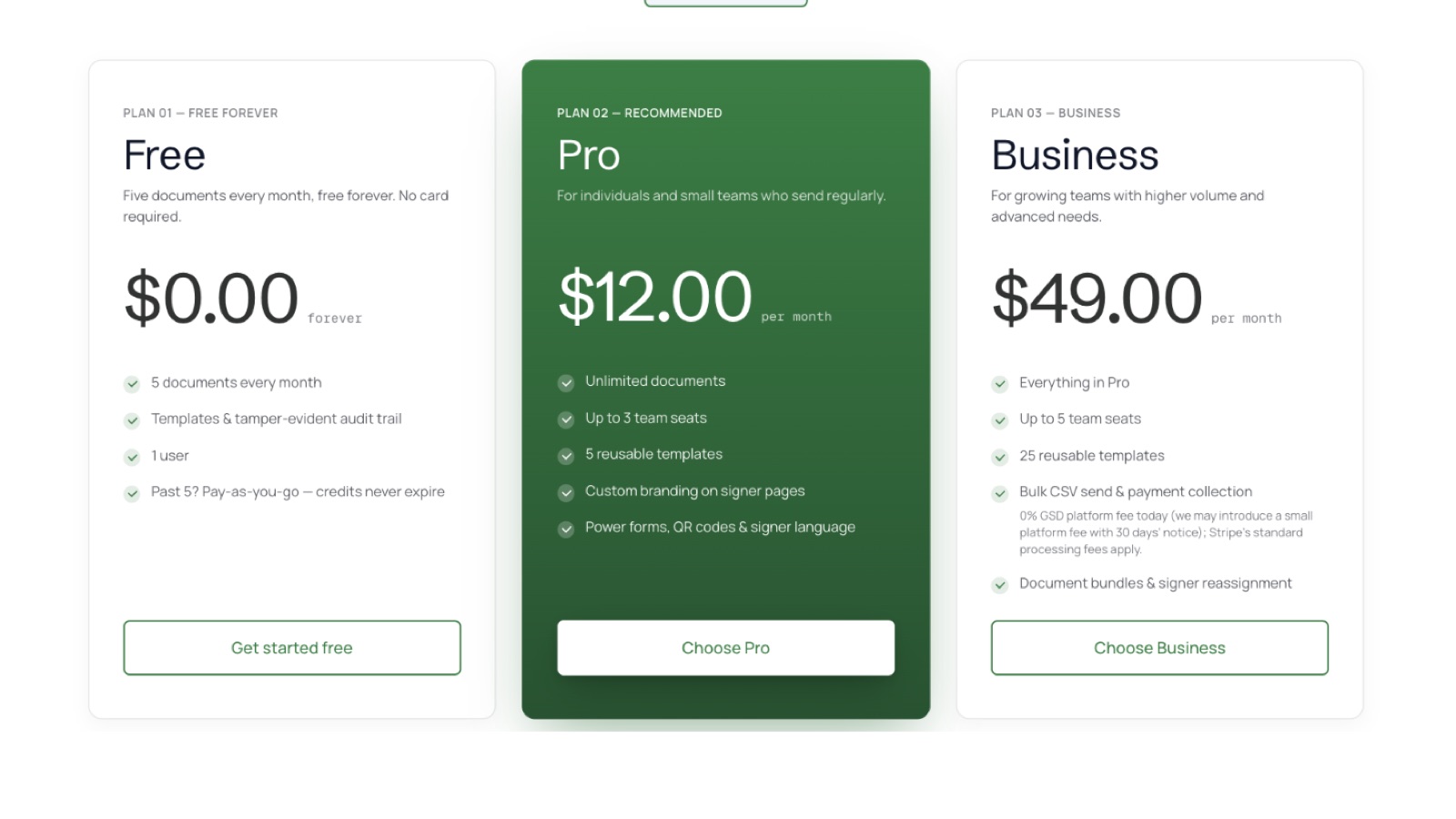
GSD e-sign is built for small firms and solo professionals who need a straightforward, compliant way to send documents for signature — without decoding a pricing matrix.
GSD offers three tiers:
- Free — 5 documents per month. Enough for occasional use or to test the workflow before committing.
- Pro — $12 per month. Designed for solo professionals with regular signing needs.
- Business — $49 per month. Built for small teams handling higher document volume.
There are no per-envelope overage charges to track and no minimum seat requirements. The price you see is the price you pay.
Making the Right Choice
Before selecting any e-signature plan, run through four questions:
- How many documents do you send per month? Match that number against the plan's envelope or transaction cap.
- How many users need access? Check for per-seat pricing and minimum seat requirements.
- Will you use it year-round? If yes, annual billing typically saves 20% to 40% over monthly.[12]
- Do you need API access or integrations? Some of these features are gated behind higher tiers.
E-signature pricing in 2026 rewards people who read the details. The headline rate is rarely the full story — but if you know what to look for, you can find a plan that fits your actual workflow without overpaying.
Sources
- How Much Does E-Signature Software Cost? 2026
- Best Electronic Signature Software 2026: Picks & Pricing
- Best Electronic Signature Software 2026: Picks & Pricing
- Best Electronic Signature Software 2026: Picks & Pricing
- Best Free eSignature Software (2026): Honest Comparison
- Best Free eSignature Software (2026): Honest Comparison
- Best Free eSignature Software (2026): Honest Comparison
- Best Free eSignature Software (2026): Honest Comparison
- Free eSignature | Countersign
- How Much Does E-Signature Software Cost? 2026
- How Much Does E-Signature Software Cost? 2026
- How Much Does E-Signature Software Cost? 2026
- eSignature and Contract Management Pricing | Signeasy
- Docusign overcharges. We don't.
- How Much Does E-Signature Software Cost? 2026
- SERVICE SCHEDULE for DOCUSIGN eSIGNATURE | DocuSign
- Adobe Sign Pricing: Complete Guide - Verdocs
- SignNow Pricing in 2026: Plans, Limits, Fees & Best Fit
- Foxit Pricing, Reviews, and Alternatives (2024) - CheckThat.ai
Ready to get signing done? Start free with 5 documents a month and no credit card, or browse the e-signature guides.