A new hire's first day usually starts with a stack: an offer letter to countersign, a W-4, a Form I-9, a direct-deposit authorization, an emergency-contact sheet, an NDA or IP assignment, a handbook acknowledgment, and whatever your state adds. Six to ten documents, often sent as six to ten separate emails, some of them printed, signed, photographed and sent back. Half of them arrive late, and someone in HR spends the week chasing the rest.
Almost all of that can be signed electronically, and it can go out as one link instead of ten emails. This post covers which onboarding forms you can e-sign and what the rules actually require, then shows how to send the whole packet at once.
Which onboarding forms can be e-signed
Start with the general rule. Under the federal ESIGN Act, a signature or contract can't be denied legal effect just because it's electronic[4]. That covers the employer-authored documents in the packet: the offer letter, NDA, IP or invention assignment, arbitration agreement, handbook and policy acknowledgments, direct-deposit authorization and emergency-contact form. If you'd accept a wet signature on it, you can accept an electronic one, provided you keep a proper record of who signed and when.
Two government forms have their own rules layered on top.
Form W-4
The IRS lets an employer set up an electronic system for employees to furnish their W-4[5]. The regulation is specific about what that system has to do: make sure the person furnishing the form is the employee named on it, capture an electronic signature that identifies the employee and authenticates the submission, have the employee sign under penalties of perjury, and be able to hand the IRS a hard copy on request along with a statement that the named employee furnished it[2]. A signing link sent to the employee's own email address, a typed or drawn signature on the form, and a downloadable completed PDF satisfy all four.
Form I-9
Form I-9 is the one people worry about. It can be e-signed, with conditions. The regulation explicitly allows the I-9 to be completed, signed and retained electronically[1]. The conditions are what matter:
- Integrity controls. The system must have reasonable controls to keep the record intact and prevent unauthorized or accidental changes[1].
- A real signature event. The electronic signature must be affixed at the time of the transaction, the system must create and preserve a record verifying the signer's identity, and the employee must be able to get a printed confirmation[1].
- An audit trail. Whenever the record is created, completed, updated or corrected, the system must produce a secure, permanent record of the date and the identity of whoever accessed it[1]. This is the requirement that a scanned PDF of a printed form does not meet.
- Deadlines are unchanged. The employee completes Section 1 by the first day of work; the employer completes Section 2 within three business days of hire[1].
One thing e-signing does not change: Section 2 requires the employer to examine the employee's identity and work-authorization documents[6]. That examination is in person by default. Employers enrolled in good standing in E-Verify may use the alternative procedure instead: review copies of the documents and hold a live video interaction with the employee[3]. If you're not on E-Verify, plan for a physical document check on or before day three.
What your e-signature tool has to produce
Read the I-9 and W-4 rules together and the shopping list is short. For every form in the packet you need:
- Proof the link went to the employee and the employee opened it.
- A signature the employee deliberately applied, with a timestamp.
- A tamper-evident record, such as a hash of the completed document, so any later change is detectable.
- A completed PDF you can download, print and hand to an auditor.
GSD records each view, click and signature with the signer's IP address and a SHA-256 hash of the document, and attaches a Certificate of Completion to every finished file. That is the audit trail the I-9 regulation describes, produced automatically rather than reconstructed later.
Send the whole packet as one link
Emailing eight signing links is better than printing eight forms, but it still leaves the new hire hunting through their inbox and HR checking eight statuses. GSD groups the packet into a single page. For the five documents almost every US hire needs, it builds the whole thing from a name and an email.
The five-document pack, from one name and one email
Open Bundles and choose Start an onboarding pack. Type the new hire's name and email address, and GSD creates five documents as drafts and groups them into one bundle:
- Employment offer letter: the job, the pay and the start date in writing, countersigned by you.
- Form I-9, Section 1: the employee's attestation of their eligibility to work.
- Form W-4: federal withholding, so the first paycheque is right.
- Direct deposit authorization: where the pay goes, typed by the employee rather than emailed to you.
- Handbook acknowledgment: evidence of which handbook they received, and when.
The W-4 and the I-9 are the official files, byte for byte, with every fillable box and the signature already placed. You aren't uploading a form you found somewhere or drawing boxes on it, and you aren't checking whether it's this year's edition. GSD ships the current one and runs a weekly check against irs.gov and uscis.gov, because a superseded edition looks official and is wrong.
Two deliberate limits. Only I-9 Section 1 carries fields: Section 2 is your attestation that you examined the documents yourself, and inviting a new hire to fill it in remotely would be inviting them to attest to something that never happened. And everything is created as a draft, because an offer letter with the wrong salary shouldn't reach a candidate just because someone typed a name and hit send. You review each document, then send.
Anything else the role needs
For an NDA, an IP assignment, an emergency-contact sheet, a state withholding form or a uniform or equipment agreement, add them as your own templates and bundle them the same way:
- Save the form as a template. Upload the PDF once and place the fields. AI field detection suggests where signatures, dates and text boxes go; you confirm and save. Next hire, the fields are already there.
- Create the envelope. Use the template, enter the employee's name and email. Fields you already know, like legal name, start date and job title, can be pre-filled by the sender so the employee isn't retyping them.
- Add it to the bundle. One share link, however many documents.
What the new hire sees
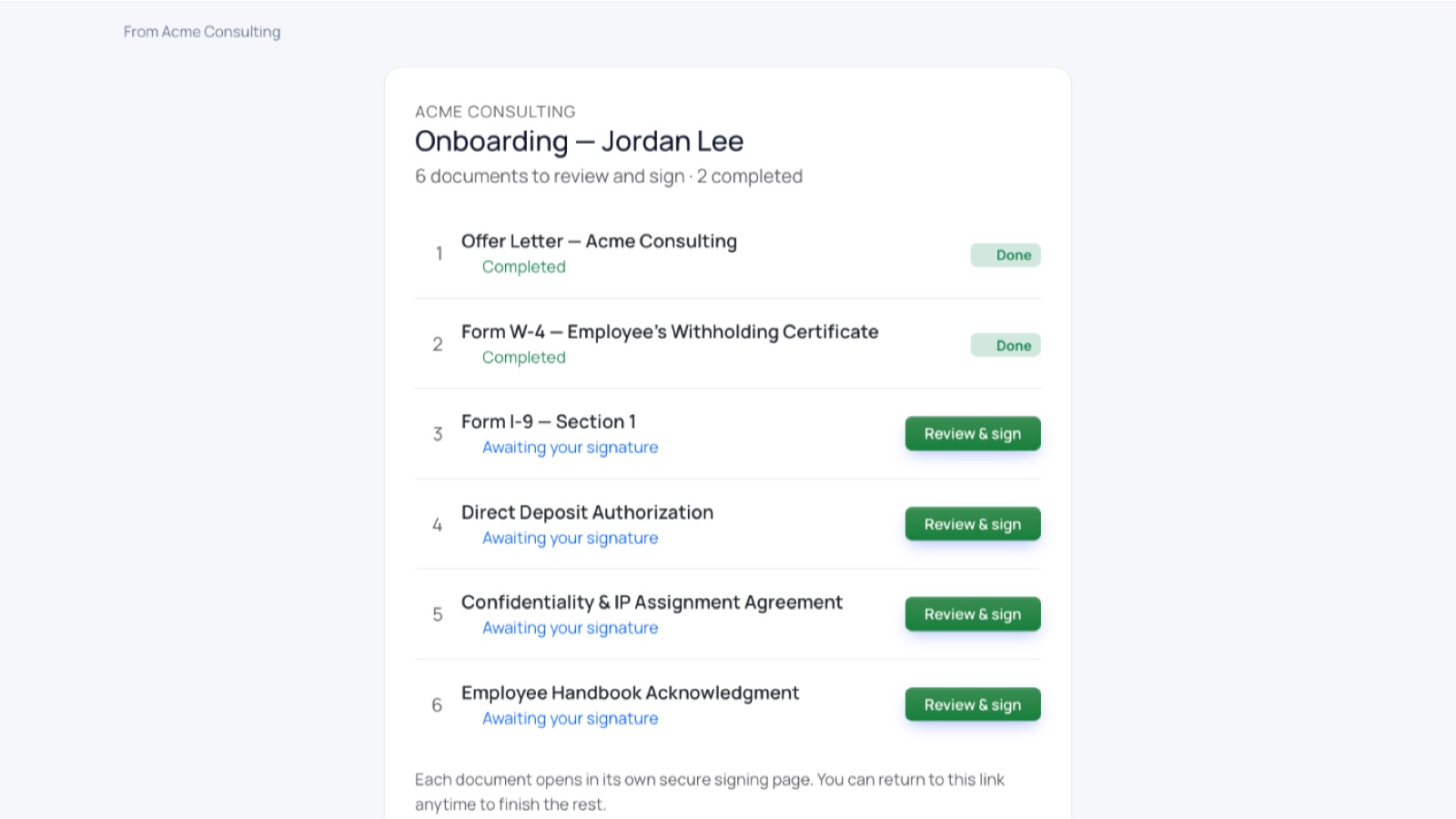
One message, one link. The employee opens it and sees a page in your branding listing every document with its status (Awaiting your signature, Completed) and a Review & sign button next to each. They can do it on a phone in the car park or at a desk on Monday morning; the page keeps score either way. Anything unsigned gets automatic reminders, and when the last document completes, HR gets the finished PDFs and certificates.
Bundles are single-recipient by design: an onboarding pack is one person's paperwork. Documents that need a countersignature, such as the offer letter or the NDA, still route to the manager afterwards, in order, exactly as they would in any envelope.
What stays manual
- I-9 Section 2 document examination, in person or by video if you're on E-Verify[3].
- State new-hire reporting to your state's directory, within 20 days of hire under federal law[7]; the signed forms give you the data, but the filing is a separate step.
- Retention. I-9s must be kept for three years after the date of hire or one year after employment ends, whichever is later[1]. Keep the completed PDFs and certificates somewhere with a retention policy. Your inbox is not an archive.
Ready to try it? Start free (five documents a month, no credit card) to build your own templates. The new-hire onboarding pack, with the W-4 and I-9 ready to send, is part of the Business plan, which also keeps completed documents for seven years. That covers the retention the W-4 and I-9 record-keeping rules require.
This article is general information, not legal or tax advice. Form I-9 and W-4 requirements have details this post does not cover, and state onboarding rules vary. Confirm your process with qualified counsel or your payroll provider.
Sources
- 8 CFR § 274a.2 — Verification of identity and employment authorization (Form I-9): electronic completion, signatures and audit trail
- 26 CFR § 31.3402(f)(5)-1 — Furnishing Form W-4 electronically
- USCIS Handbook for Employers M-274, §4.5 — Remote document examination (alternative procedure for E-Verify employers)
- 15 U.S.C. § 7001 — ESIGN Act, general rule of validity
- IRS — About Form W-4, Employee's Withholding Certificate
- USCIS — Form I-9 acceptable documents (Lists A, B and C)
- 42 U.S.C. § 653a — State Directory of New Hires; employer reporting within 20 days of hire
Ready to get signing done? Start free with 5 documents a month and no credit card, or browse the e-signature guides.